Speech Analytics for amoCRM and Bitrix24: Call Scores in the Deal Card
· Updated
Score every call against your checklist, not a sample
Request a demoA rep finishes a call with a customer, hangs up and opens the deal card. What does it say? Most often nothing, or two lines typed from memory. The manager looks at the funnel and cannot tell what was agreed or why the customer went cold. Speech analytics connected to your CRM solves this: the summary of every call appears in the deal card with no effort from the rep.
Why a call summary belongs in the deal card
Call recordings usually live in one place and deals in another. To find out what happened on a call, a manager opens the CRM, finds the recording in the telephony system, plays it and returns to the card. Reps save time and skip the fields, so the deal history is incomplete.
When the summary lands in the card automatically:
- The deal history is always complete. Every call leaves a trace: what was discussed and how it ended.
- Handoffs lose nothing. A new rep opens the deal and sees what was discussed and agreed.
- Managers see quality in the funnel. The call score sits next to the deal stage, not in a separate spreadsheet.
- Tasks do not get lost. Next steps from the conversation become tasks that can be checked.
What Leksta sends to the CRM
You choose the data yourself: the administrator configures what to send and where. Typically the card receives:
- a short call summary: what was discussed, what was decided, what the next step is;
- the call score against a checklist and the script items that were missed;
- customer sentiment over the course of the conversation;
- tasks from the call: the next step that has to be done;
- an AI customer profile: communication style, attitude to price, objections. The profile goes in as a note or into a card field.
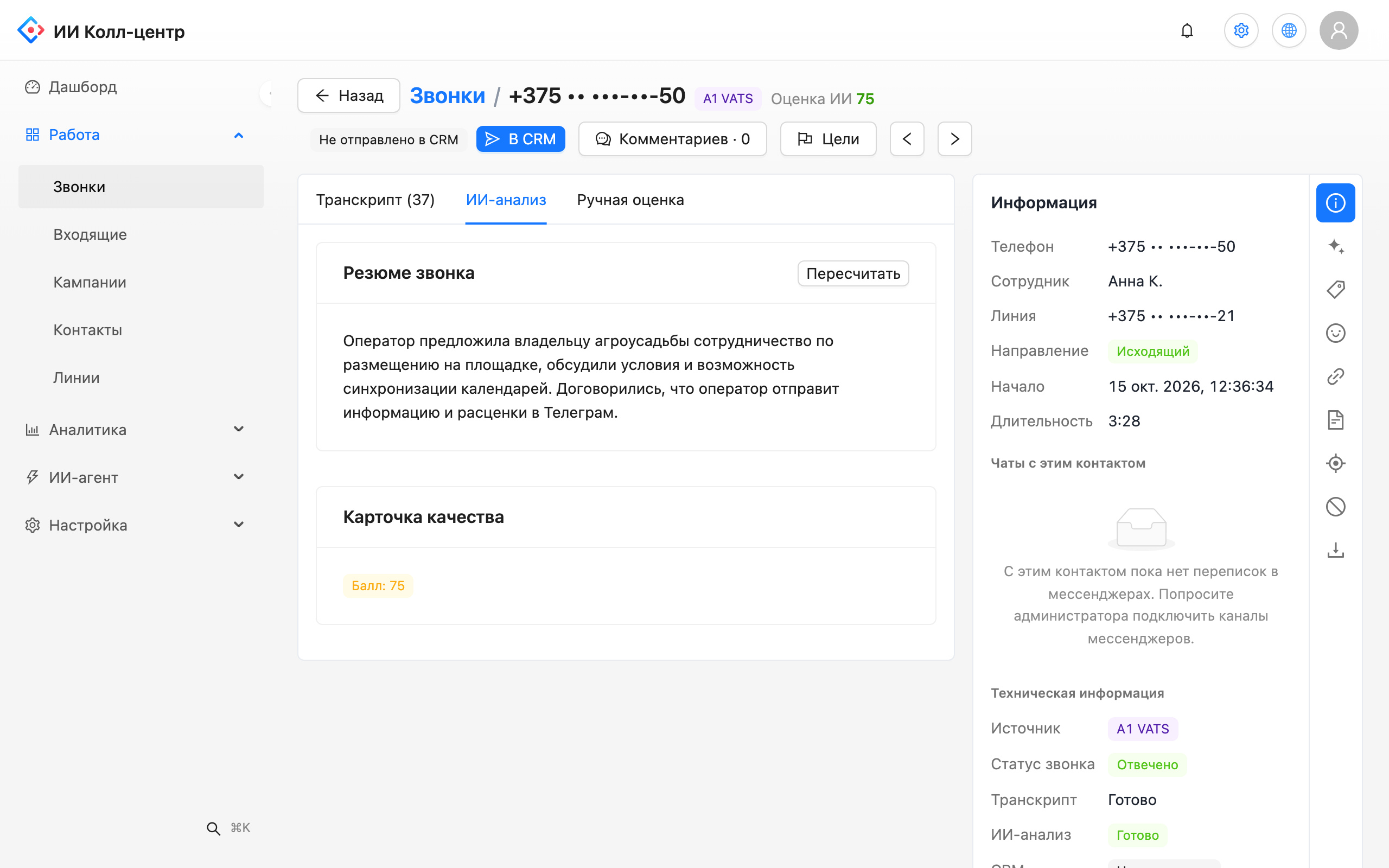
Every AI conclusion in the summary links to the exact moment in the recording. If a manager doubts it, they open the call and hear the original phrase.
What it looks like for reps and managers
The rep. Ends the call, opens the card: the summary, agreements and next step are already there. All that is left is to set a task or fix the wording, instead of writing a report from scratch.
The sales manager. Opens a deal and immediately sees the summary and score of the call. No need to search for the recording in the telephony system. If a review is needed, they jump to the right second in Leksta and leave the rep a comment.
The owner. Opens a deal and sees the summary and score of every call on it, without opening recordings.
amoCRM or Bitrix24: what is shared and what differs
The principle is the same: Leksta receives call recordings from your telephony, analyzes them and returns the result to the CRM. The only difference is how data is laid out on the CRM side: amoCRM (known abroad as Kommo) and Bitrix24 have their own entities, fields and ways to add a note. When we connect you, we set this up for your funnel: which fields to fill, in which deals and at which stages.
If you use both systems or are moving from one to the other, call summaries keep arriving under the same rules: only the destination changes.
How to connect
- Telephony. Recordings come from A1 vATS (a Belarusian cloud PBX) or Asterisk, and can also be uploaded as files, including in bulk. The article on connecting to A1 vATS and Asterisk shows how it looks. The list of connections is on the integrations page.
- CRM. We connect Leksta to your amoCRM or Bitrix24 account. Step-by-step guides: amoCRM and Bitrix24.
- Settings. The administrator chooses what to send (summary, score, sentiment, tasks, customer profile), where (note or field) and for which deals.
- A check on your calls. We run 20-30 anonymized recordings and show how the summaries look in your cards.
Want to review your own calls this way?
14 days and 120 minutes of calls free, no card
Using the call score in a deal
CRM data is valuable when people use it. Typical scenarios for a manager:
- Filter deals by score. Pick deals at the "Negotiation" stage where the last call scored low and find out what is wrong.
- Task control. Find deals where the next step from the last call is still not done.
- Loss analysis. Compare call summaries across closed deals and spot recurring objections.
- Handoffs between reps. The new owner reads the summaries of past conversations instead of questioning a colleague.
None of this needs a separate reporting system: it is all in the CRM your team already knows.
Who benefits most
- Sales teams with a long deal cycle, where a customer talks to a rep several times and remembering agreements matters.
- Teams that hand customers over between reps, where losing context is expensive.
- Managers responsible for quality who cannot review every recording and want the result in a familiar CRM.
- Business owners who need a transparent funnel without manual reports from reps.
How to tell the connection works: the first two weeks
You do not need complex metrics to judge the value. Check four things:
- Card completeness. How many deals received a call summary without the rep's help. It used to be a handful; now it is every conversation.
- Review time. How many minutes it takes to understand what happened in a deal. Opening the card is enough.
- Reaction speed. How fast a manager notices a low-scoring call or an unfinished task: the same day, not at the next weekly meeting.
- Reps' feedback. Is there less routine after calls? If reps stopped writing notes by hand, the integration works.
If after two weeks you need other fields or rules, we adjust the data transfer: the settings are flexible, and the administrator changes them without us.
Customer data and roles
Call results contain business information, so access is restricted. Leksta has the roles "Operator", "Supervisor" and "Administrator", and you can create custom roles. A rep sees only their own calls, a manager sees the team, and the audit log records changes to users and roles and every reveal of hidden data. Phone and card numbers are masked, and only an administrator can reveal them, with a stated reason that goes into the log. The administrator sets how many days recordings are kept.
What the business gets
- A complete deal history with no manual entry.
- Transparent quality control where the funnel is managed.
- Fewer lost agreements and unfinished tasks.
- A fast ramp-up when the responsible rep changes.
- One process for sales, support and quality control. For the bigger picture see call analytics; for terms, see pricing.
Try Leksta free
Want to see your own calls in amoCRM or Bitrix24 cards? Try Leksta with up to 600 minutes of calls free. Upload recordings or connect your telephony, and Leksta shows which data will land in the deal.

FAQ
What call data goes to amoCRM and Bitrix24?
Leksta sends the deal card a short call summary, the checklist score, customer sentiment and tasks from the conversation. We do the connection with you: we link your CRM account and configure which data goes where.
How does a call score get into the deal card?
Leksta receives the recording from your telephony, transcribes and scores the conversation against a checklist, then sends the result to the CRM as a note or into a card field. The administrator chooses what to send, so reps see only what is useful.
What does a rep see in the card after a call?
A short call summary, the agreements and the next step. If the AI customer profile is on, they also see its main traits. All that is left is to set a task and clarify details.
How fast do calls appear in the deal card?
The summary reaches the card automatically, with no action from the rep: Leksta receives the recording from your telephony, transcribes and scores the conversation, then sends the result to the CRM. A manager opens the deal and immediately sees the summary and score.
Try Leksta on your own calls
Connect your PBX and get your first scores within 14 days, free, no card needed
Related articles
Send Asterisk Call Recordings to Leksta Over HTTPS
HTTPS push sends each finished Asterisk or FreeSWITCH call recording to Leksta over an encrypted connection that your PBX opens itself. It needs one small agent and a revocable token, and it works in the cloud and on-premise. Compare it with SFTP pull and Shared folder.
Lost deal reasons: how to capture them from calls and act on them
The most reliable way to track lost deal reasons is to take them from conversations, not from a rep's memory. Keep a short list of reasons, record one for every lost deal, and write "reason not stated" when the customer gave none. Review the trend weekly, then change the script, the price or the process.
Lead vs Deal: What to Create in Your CRM After a Call
A lead is an inquiry where it is not yet clear whether the person will buy. A deal is an actual sale with stages, an amount and an owner. If calls come from mixed sources and some are random, create a lead and qualify it. If almost every call is already an order, create a deal. Bitrix24 example inside.