Sales script compliance: how to check every call automatically
· Updated
Score every call against your checklist, not a sample
Request a demoSales script compliance monitoring checks that a rep completed the required steps in every conversation: introduced the company, identified the customer's need, stated the terms and agreed on a next step. In Leksta, AI compares every call with your script, not ten calls a day, and shows the missed items with a link to the exact moment in the recording.
A sales manager can review about ten calls a day. The other hundreds of conversations go unchecked: whether a rep skipped discovery, quoted a price or agreed on a next step, nobody knows.
Why manual script checks cannot keep up
A script exists so that every customer hears the essentials: how you can help, what it costs and what to do next. But checking it by hand takes time. You have to find the call, listen to all of it, tick a scorecard and write notes. One conversation costs as much time as it lasted, plus minutes for the feedback.
Three typical problems follow:
- The sample is random. A manager listens to whatever came to hand and judges the whole team by ten calls.
- Scores depend on the reviewer's mood. One counts "found out the need" after one question, another wants three.
- Feedback is late. A rep hears the comment a week later, after repeating the mistake in forty more calls.
Automatic checking changes the principle: full coverage instead of a sample, one criterion for every call instead of "by eye".
How automatic script control works in Leksta
You upload a script document or build a scorecard from templates. The AI transcribes the call and compares the conversation with the script. The result:
- an overall call score against the scorecard;
- a list of completed and missed items;
- a short AI conclusion: what went well and what to fix;
- a link to the moment in the recording behind each finding.
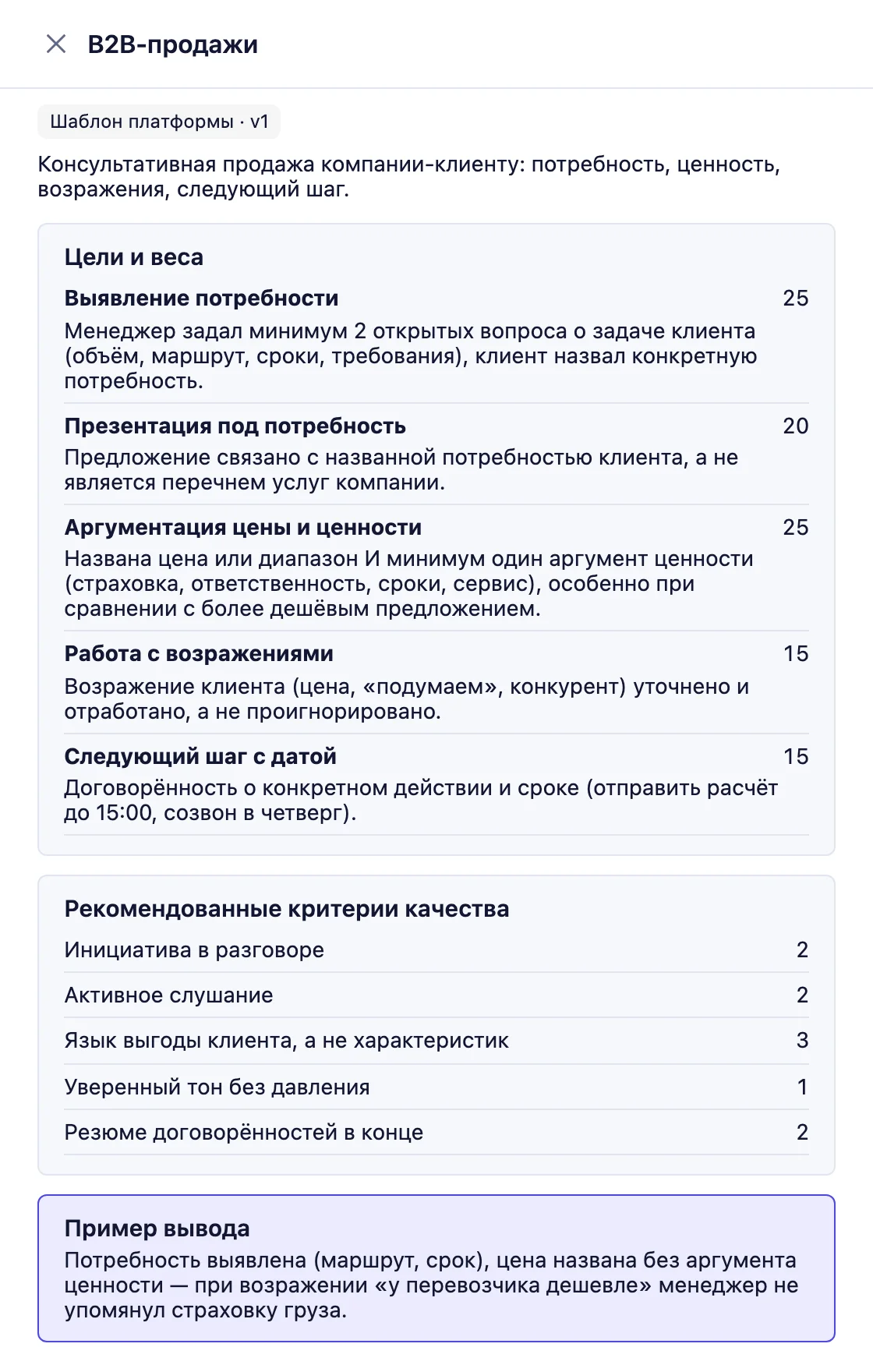
A manager does not retell a conversation from memory. They open the call, click an item and hear the exact phrase that made the item pass or fail.
Required items: what must be said on every call
Every script has blocks without which a call counts as failed: introduce yourself and the company, find out the customer's task, state the terms, propose a next step. In Leksta these blocks are marked as required items. If a rep misses one, the supervisor sees the call right away.
What you can configure:
- which items are required and which are nice to have;
- the weight of each item in the final score;
- criteria in your own words: "named the price and offered a choice of options", "clarified the timeline", "agreed on a time for the next contact".
Ready-made scorecard templates for different industries help you start faster: see the guide to building a call scorecard. For B2B sales the library has a template with stages: discovery, presentation, price justification, objection handling.
Keeping the live conversation inside the script
A common fear: "AI will demand that reps read the script word for word, and customers will sense a robot." A good scorecard scores meaning, not verbatim text. The criterion "found out why the customer needs the product" passes if the rep asked in their own words and got an answer. You write criteria the way your best rep understands them, and the AI follows the meaning.
To make AI scores match your expectations, use calibration: pick a few calls, score them yourself and compare with the AI score. If they differ, clarify the criterion wording and check again. The scorecard is tuned once and then works on every call.
Which script mistakes show up most often
When you check all calls, not ten a day, patterns appear. This is what managers usually look for and what the check reveals:
| What is checked | What problem it reveals |
|---|---|
| Discovery | The rep starts describing the product at once and never asks why the customer needs it |
| Price justification | The price is stated without explaining the value, and the customer leaves to "think about it" |
| Objection handling | "Too expensive" is answered with a discount instead of an argument |
| Next step | The call ends with "I'll call you back" and no date |
| Promises to the customer | "I'll send the quote" is said, but there is no task in the CRM |
Every row of this table becomes a scorecard item. After a week you see specifics instead of a general impression: which rep drops on price justification and who consistently closes a call with an agreement.
Want to review your own calls this way?
14 days and 120 minutes of calls free, no card
Automatic control vs. spot-check listening
- Coverage. Every call is checked, not just those a manager had time to open.
- One criterion. The same item is scored the same way for every rep and every shift.
- Feedback speed. A rep gets a review the same day, while the conversation is fresh.
- Manager time. Instead of searching and listening, you review only calls with something to fix.
- Evidence. A disputed finding is checked by ear in seconds: every item links to the moment in the recording.
What a supervisor does with the result
An automatic score is useless without a next action. In Leksta the result is built into the supervisor's workflow.
- Attention queue. Calls with missed required items and low scores rise to the top. Starting the day with problem conversations beats starting with random ones.
- Review with the rep. The supervisor adds a comment to the AI conclusion and sends it to the rep. The rep confirms they have read it, and the supervisor sees that in the system.
- Repeated mistakes. If several reps share a problem, for example nobody proposes a next step, it is a reason for group training. For that there is an AI sales trainer: a rep practises an objection in a dialogue with an AI customer.
- Summaries. Daily, weekly and monthly summaries show how script compliance changes for each rep and for the team. How to turn these numbers into plan vs. actual is covered in the article on sales rep call KPIs.
What else you can check besides the script
Script control is only part of call quality scoring. In the same conversation the AI evaluates other things that matter to your business:
- how the rep handled the customer's objections;
- whether a concrete next step and date were agreed;
- which promises the rep made: "I'll send a quote today", "I'll call on Thursday";
- the customer's mood during the call: where they were left dissatisfied.
All of this lands in one report, so a supervisor does not have to open five different spreadsheets.
How to start: three steps
- Prepare the script and scorecard. Upload the script document or pick a template for your industry and edit the criteria.
- Connect call recordings. Leksta works with A1 vATS (a Belarusian cloud PBX) and Asterisk, and recordings can also be uploaded as files, including in bulk. Details are on the integrations page.
- Check the result on your own calls. We review your recordings and show which script items are followed and which are not. Prepare 20 to 30 anonymized recordings: that is enough to see the picture.
For the full picture, see sales script control and speech analytics for calls. Terms are on the pricing page.
Try Leksta free
Want to see how closely your reps really follow the script? Try Leksta: up to 600 call minutes free, no card. Upload a few recordings, and the console shows a scorecard result, missed items and links to moments in the conversation.

FAQ
How do I automatically check that a rep follows the sales script?
Upload the script or scorecard to a speech analytics system. The AI transcribes the call, compares it with the required items and shows which were completed and which missed. Every finding links to a moment in the recording, so it is easy to verify by ear.
Can I check the sales script on all calls instead of a sample?
Yes. Leksta transcribes and scores every conversation that enters the system, not a random sample. A supervisor sees the score of each call and opens first those with missed required items or a low score.
Why do required items matter in call scoring?
Required items mark what a call cannot succeed without, such as discovery or an agreed next step. If an item is missed, the supervisor sees the call immediately and does not have to hunt for the problem among hundreds of conversations.
How is automatic script control better than spot-check listening?
It checks every call, not only those a manager had time to open, and scores each item by the same criterion for all reps and shifts. A rep gets feedback the same day, and a disputed finding can be checked by ear through the link to the recording.
Try Leksta on your own calls
Connect your PBX and get your first scores within 14 days, free, no card needed
Related articles
Send Asterisk Call Recordings to Leksta Over HTTPS
HTTPS push sends each finished Asterisk or FreeSWITCH call recording to Leksta over an encrypted connection that your PBX opens itself. It needs one small agent and a revocable token, and it works in the cloud and on-premise. Compare it with SFTP pull and Shared folder.
Lost deal reasons: how to capture them from calls and act on them
The most reliable way to track lost deal reasons is to take them from conversations, not from a rep's memory. Keep a short list of reasons, record one for every lost deal, and write "reason not stated" when the customer gave none. Review the trend weekly, then change the script, the price or the process.
Lead vs Deal: What to Create in Your CRM After a Call
A lead is an inquiry where it is not yet clear whether the person will buy. A deal is an actual sale with stages, an amount and an owner. If calls come from mixed sources and some are random, create a lead and qualify it. If almost every call is already an order, create a deal. Bitrix24 example inside.